
REST API Reference
The RepairOps REST API lets you integrate external systems with your shop — read and create tickets, customers, and devices, look up inventory, pull KPI and usage data, manage outbound webhooks, and submit marketplace plugins.
Available on: Business and Enterprise tiers. The API key
middleware checks subscription_tier on every request and returns 403 FORBIDDEN for Starter and
Pro organizations.
Authentication
Section titled “Authentication”Every request authenticates with a bearer API key:
Authorization: Bearer ro_live_xxxxxxxxxxxxxxxxxxxxxxxxxxxxxxxxxxxxxxxxxxxxxxxxxxxxxxxxxxxxxxxx- Keys are 32 random bytes, hex-encoded, prefixed
ro_live_. Only a SHA-256 hash of the key is stored — the full key is shown once at creation and cannot be retrieved later. - Create and revoke keys in Settings → API Keys. Only an organization OWNER can mint or revoke keys (this is enforced in the server action, not just the UI).
- A missing/malformed header returns
401 UNAUTHORIZED; a revoked or expired key also returns401.
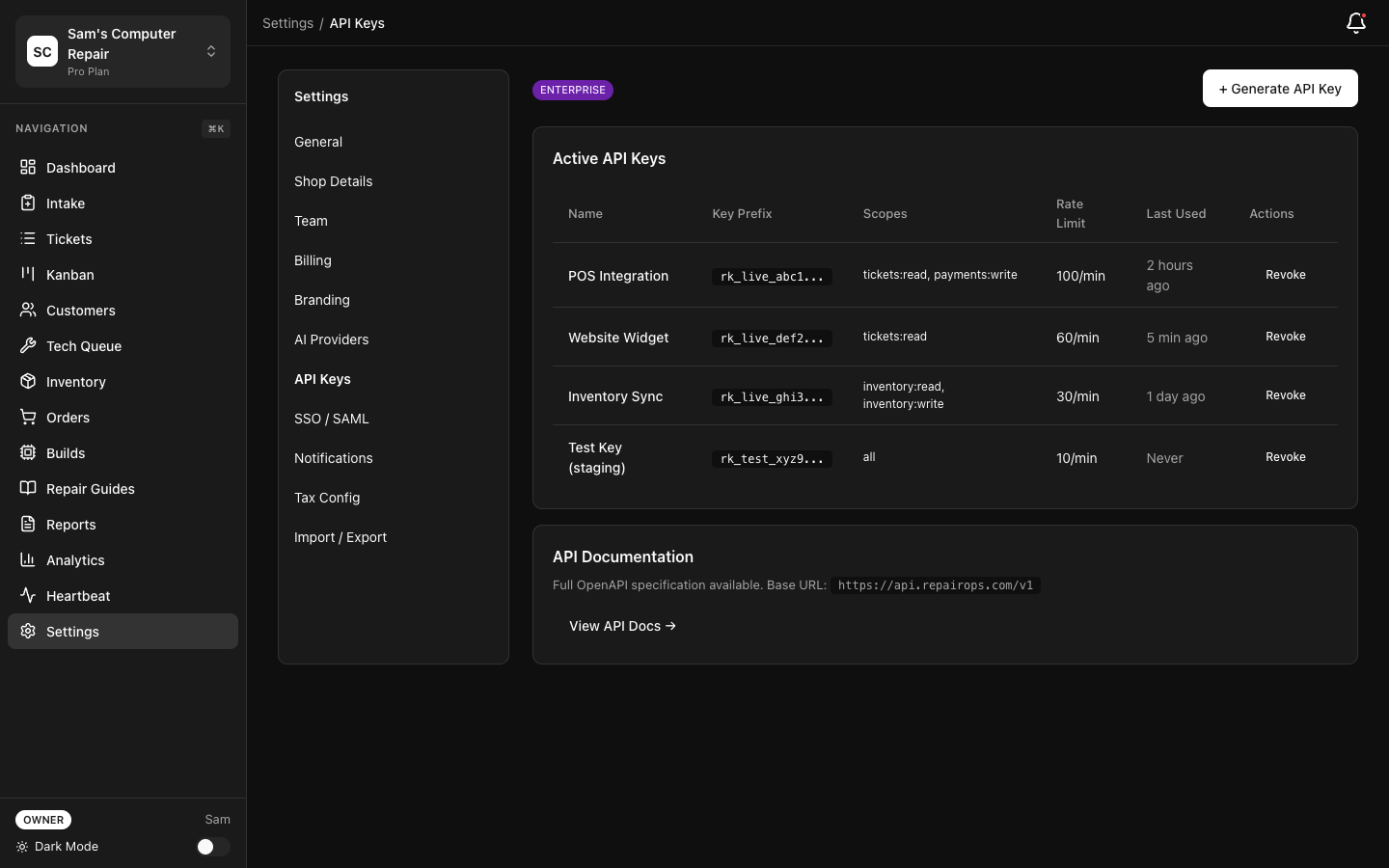
Scopes
Section titled “Scopes”Each key carries one or more scopes. Scopes are hierarchical, not per-resource:
| Scope | Grants |
|---|---|
read | Read-only access (all GET endpoints) |
write | Everything read can do, plus create/update (POST/PATCH) |
admin | Everything write can do, plus webhook management and plugin submission |
A write key satisfies any read requirement; an admin key satisfies everything. There are no
resource-scoped permissions such as tickets:read — scope is global across the API.
Base URL
Section titled “Base URL”https://app.repairops.app/api/v1All examples below use this base URL.
Quickstart Playground
Section titled “Quickstart Playground”These examples cover the three most common starting points.
/tickets?status=IN_REPAIR&per_page=25 curl -X GET "https://app.repairops.app/api/v1/tickets?status=IN_REPAIR&per_page=25" \
-H "Authorization: Bearer ro_live_YOUR_API_KEY"const response = await fetch(
"https://app.repairops.app/api/v1/tickets?status=IN_REPAIR&per_page=25",
{
headers: {
Authorization: "Bearer ro_live_YOUR_API_KEY",
},
}
);
const { ok, data, meta } = await response.json();
console.log(data, meta);import requests
response = requests.get(
"https://app.repairops.app/api/v1/tickets",
params={"status": "IN_REPAIR", "per_page": 25},
headers={"Authorization": "Bearer ro_live_YOUR_API_KEY"},
)
print(response.json()){
"ok": true,
"data": [
{
"id": "550e8400-e29b-41d4-a716-446655440000",
"ticket_code": "T-001234",
"status": "IN_REPAIR",
"priority": "standard",
"issue_category": "screen_repair",
"issue_description": "Cracked screen",
"org_id": "org-uuid",
"shop_id": "shop-uuid",
"customer_id": "customer-uuid",
"device_id": "device-uuid",
"assigned_tech_id": "tech-uuid",
"created_at": "2026-06-01T10:30:00Z",
"updated_at": "2026-06-02T14:15:00Z"
}
],
"meta": { "page": 1, "perPage": 25, "total": 1 }
}/tickets/:id curl -X GET "https://app.repairops.app/api/v1/tickets/TICKET_ID" \
-H "Authorization: Bearer ro_live_YOUR_API_KEY"const response = await fetch(
"https://app.repairops.app/api/v1/tickets/TICKET_ID",
{
headers: {
Authorization: "Bearer ro_live_YOUR_API_KEY",
},
}
);
const { data: ticket } = await response.json();
console.log(ticket);import requests
response = requests.get(
"https://app.repairops.app/api/v1/tickets/TICKET_ID",
headers={"Authorization": "Bearer ro_live_YOUR_API_KEY"},
)
print(response.json()){
"ok": true,
"data": {
"id": "550e8400-e29b-41d4-a716-446655440000",
"ticket_code": "T-001234",
"status": "IN_REPAIR",
"priority": "standard",
"issue_category": "screen_repair",
"issue_description": "Cracked screen",
"consent_signed": true,
"findings_summary": "Digitizer cracked; LCD intact",
"org_id": "org-uuid",
"shop_id": "shop-uuid",
"customer_id": "customer-uuid",
"device_id": "device-uuid",
"assigned_tech_id": "tech-uuid",
"created_at": "2026-06-01T10:30:00Z",
"updated_at": "2026-06-02T14:15:00Z",
"customers": { "id": "customer-uuid", "first_name": "John", "last_name": "Doe", "email": "john@example.com", "phone": "555-0123" },
"devices": { "id": "device-uuid", "device_type": "phone", "make": "Apple", "model": "iPhone 14 Pro", "serial": "F2L...", "identifier": "IMEI 35..." },
"shops": { "id": "shop-uuid", "name": "Downtown", "code": "DT" }
}
}/tickets curl -X POST "https://app.repairops.app/api/v1/tickets" \
-H "Authorization: Bearer ro_live_YOUR_API_KEY" \
-H "Content-Type: application/json" \
-d '{
"shop_id": "shop-uuid",
"customer_id": "customer-uuid",
"device_id": "device-uuid",
"issue_category": "screen_repair",
"issue_description": "Cracked screen, won'\''t respond to touch",
"priority": "standard"
}'const response = await fetch("https://app.repairops.app/api/v1/tickets", {
method: "POST",
headers: {
Authorization: "Bearer ro_live_YOUR_API_KEY",
"Content-Type": "application/json",
},
body: JSON.stringify({
shop_id: "shop-uuid",
customer_id: "customer-uuid",
device_id: "device-uuid",
issue_category: "screen_repair",
issue_description: "Cracked screen, won't respond to touch",
priority: "standard",
}),
});
const { data: created } = await response.json();
console.log(created);import requests
response = requests.post(
"https://app.repairops.app/api/v1/tickets",
headers={
"Authorization": "Bearer ro_live_YOUR_API_KEY",
"Content-Type": "application/json",
},
json={
"shop_id": "shop-uuid",
"customer_id": "customer-uuid",
"device_id": "device-uuid",
"issue_category": "screen_repair",
"issue_description": "Cracked screen, won't respond to touch",
"priority": "standard",
},
)
print(response.json()){
"ok": true,
"data": {
"id": "ticket-uuid",
"ticket_code": "T-001235",
"status": "INTAKE",
"created_at": "2026-06-12T10:00:00Z"
}
}Response Format
Section titled “Response Format”Every response is a JSON envelope with a top-level ok boolean.
Success:
{ "ok": true, "data": { }, "meta": { "page": 1, "perPage": 25, "total": 123 }}meta is present only on paginated list endpoints. Note the casing: the request param is
snake_case per_page, but the response field is camelCase perPage.
Error:
{ "ok": false, "error": { "code": "VALIDATION_ERROR", "message": "shop_id and customer_id are required", "details": { } }}details is optional and only included on some errors (rate limiting, scope failures, plan-limit
exhaustion, and transition gate failures).
Error Codes
Section titled “Error Codes”Codes are string literals returned in error.code. The full catalog the API emits:
| Code | HTTP | Meaning |
|---|---|---|
UNAUTHORIZED | 401 | Missing/invalid/revoked/expired API key |
FORBIDDEN | 403 | Tier too low for the API, or key lacks the required scope |
PLAN_LIMIT_REACHED / LIMIT_REACHED | 402 | Period meter exhausted (e.g. api_calls, work orders) |
RATE_LIMITED | 429 | Per-key rate limit exceeded (see Retry-After) |
INVALID_JSON | 400 | Request body is not valid JSON |
VALIDATION_ERROR | 400 | Missing or invalid parameters |
INVALID_MANIFEST | 400 | Plugin manifest failed SDK validation |
LIMIT_EXCEEDED | 400 | Resource cap reached (e.g. 10 webhook endpoints/org) |
NOT_FOUND | 404 | Resource does not exist or belongs to another org |
CONFLICT | 409 | Optimistic-concurrency mismatch on a ticket transition |
PERMISSION_DENIED | 403 | Transition not allowed for the acting role |
INVALID_TRANSITION | 422 | Transition not in the state graph |
GATE_NOT_MET | 422 | A ticket exit gate (or payment gate) is unsatisfied |
QUERY_ERROR / INSERT_ERROR / UPDATE_ERROR / DELETE_ERROR / TRANSITION_ERROR | 500 | Database error |
INTERNAL_ERROR | 500 | Unhandled server error |
Rate Limiting
Section titled “Rate Limiting”Rate limits are enforced per API key, not per scope, on a sliding 60-second window:
- Default: 100 requests / minute (Enterprise keys: 1,000 / minute). The exact value is the
key’s
rate_limit_per_minute. - On exhaustion the API returns
429 RATE_LIMITEDwithdetails: { limit, remaining: 0 }and aRetry-After: 60response header.
There are no X-RateLimit-* headers — Retry-After is the only rate-limit header.
Separately, each request consumes one unit of the org’s monthly api_calls meter (Business
50,000 / Enterprise 500,000). When that period meter is exhausted you get 402 PLAN_LIMIT_REACHED
until the billing period resets.
Cross-origin browser requests are governed by a fail-closed allowlist (API_CORS_ORIGINS). Only
exact-match origins receive Access-Control-Allow-Origin. The API never responds with *. Treat
keys as server-side secrets — do not embed them in browser code.
Pagination
Section titled “Pagination”List endpoints use offset pagination via page and per_page:
GET /tickets?page=2&per_page=50page— 1-based, default1.per_page— default25, max100.- The response
metacarries{ page, perPage, total }, wheretotalis the exact row count.
There is no cursor pagination and no limit/offset/cursor parameters. Most list endpoints
silently fall back to defaults on unparseable pagination params (the exception is
/plugins/submissions, which returns 400 VALIDATION_ERROR).
Tickets
Section titled “Tickets”List Tickets
Section titled “List Tickets”GET /tickets — scope read.
Query parameters: page, per_page, status (validated against the ticket status enum —
invalid values return 400), shop_id, customer_id.
Returns the list-serializer fields per ticket: id, ticket_code, status, priority,
issue_category, issue_description, org_id, shop_id, customer_id, device_id,
assigned_tech_id, created_at, updated_at.
Get Ticket
Section titled “Get Ticket”GET /tickets/:id — scope read.
Returns the full ticket serializer (the list fields plus consent_signed, findings_summary) and
embedded customers, devices, and shops objects. This is the same shape delivered in ticket
webhook payloads. Not found / cross-org → 404 NOT_FOUND.
Create Ticket
Section titled “Create Ticket”POST /tickets — scope write.
Body:
| Field | Required | Notes |
|---|---|---|
shop_id | ✓ | Must belong to your org |
customer_id | ✓ | Must belong to your org |
device_id | ✓ | Must belong to your org — devices are not auto-created |
issue_category | — | |
issue_description | — | Free-text description of the reported issue |
priority | — | Defaults to standard |
Creation runs through the atomic intake routine (meter check + ticket insert + ticket_created
event), assigns the ticket code via a DB trigger, and emits the ticket.created webhook. Returns
201 with { id, ticket_code, status: "INTAKE", created_at }. Hitting the monthly work-order
limit returns 402 LIMIT_REACHED.
Update Ticket
Section titled “Update Ticket”PATCH /tickets/:id — scope write.
Only these fields can be updated: issue_category, issue_description, priority,
assigned_tech_id, findings_summary. Status cannot be changed via PATCH — use the
transition endpoint. A no-op (no field actually changed) returns 200 and writes nothing.
Changes emit a ticket.updated webhook with a per-field { from, to } change map.
Transition Ticket Status
Section titled “Transition Ticket Status”POST /tickets/:id/transition — scope write.
Moves a ticket through the state machine, running the same
validation as the staff app (state graph + exit gates + payment-completion gate). A write key
may perform any transition that is valid for the ticket’s current status.
Body:
expected_status(required) — the status you believe the ticket is in (optimistic concurrency).new_status(required) — the target status.notes(optional) — a comment recorded with the change.
{ "expected_status": "IN_REPAIR", "new_status": "QC_REVIEW", "notes": "Ready for QC" }Success (200):
{ "ok": true, "data": { "ticket_id": "ticket-uuid", "from": "IN_REPAIR", "to": "QC_REVIEW", "event_id": "event-uuid", "outbox_id": "outbox-uuid" }}to may differ from your requested new_status — an APPROVED transition auto-advances to
WAITING_ON_PARTS when the approved quote has parts that still need ordering.
Errors: 409 CONFLICT when expected_status doesn’t match the current status;
403 PERMISSION_DENIED; 422 INVALID_TRANSITION; 422 GATE_NOT_MET (including the
payment-completion gate when closing a ticket with an unpaid invoice).
Customers
Section titled “Customers”List Customers
Section titled “List Customers”GET /customers — scope read. Query: page, per_page, search (matches first name, last
name, email, or phone). Returns id, first_name, last_name, email, phone,
preferred_contact, customer_source_id, customer_source, tags, notes, created_at.
Create Customer
Section titled “Create Customer”POST /customers — scope write. Body: first_name, last_name (at least one required),
email, phone, preferred_contact (default email), customer_source_id (must reference an
active source in your org), tags (string array), notes. Returns 201.
Get Customer
Section titled “Get Customer”GET /customers/:id — scope read. Adds address and marketing_opt_out to the list fields.
No PATCH or DELETE — customer records cannot be edited or removed through the API.
Devices
Section titled “Devices”List Devices
Section titled “List Devices”GET /devices — scope read. Query: page, per_page, customer_id. Returns id,
customer_id, device_type, make, model, serial, identifier, specs, created_at.
Create Device
Section titled “Create Device”POST /devices — scope write. Body: customer_id (required), device_type (required), make,
model, serial, identifier. The customer must belong to your org. Returns 201. Because
POST /tickets requires an existing device_id, create the device first.
Get Device
Section titled “Get Device”GET /devices/:id — scope read. No PATCH or DELETE.
Inventory
Section titled “Inventory”The inventory API is read-only — there are no create, update, or delete endpoints.
List Inventory
Section titled “List Inventory”GET /inventory — scope read. Query: page, per_page, shop_id, low_stock=true (items
where quantity_on_hand <= reorder_point). Returns id, name, sku, category,
quantity_on_hand, reorder_point, unit_cost, unit_price, shop_id, is_active,
created_at, updated_at.
Get Inventory Item
Section titled “Get Inventory Item”GET /inventory/:id — scope read. Adds description to the list fields.
Reports
Section titled “Reports”KPI Summary
Section titled “KPI Summary”GET /reports/kpis — scope read. Optional shop_id. Returns a 30-day snapshot:
{ "ok": true, "data": { "period": "last_30_days", "open_tickets": 42, "closed_tickets": 118, "created_tickets": 130, "snapshot": { } }}open_tickets counts tickets not in CLOSED/UNCLAIMED/VOIDED. snapshot is the latest daily
kpi_snapshots row (or null).
Usage Metrics
Section titled “Usage Metrics”GET /reports/usage — scope read. Returns API request volume and current billing-period meters:
{ "ok": true, "data": { "period": "last_30_days", "api_requests_total": 8421, "active_api_keys": 3, "usage_meters": [ { "meter_type": "api_calls", "usage_count": 8421, "limit_value": 50000, "period_start": "2026-06-01", "period_end": "2026-07-01" } ] }}Webhooks (Management)
Section titled “Webhooks (Management)”Webhook endpoints are managed through the API with an admin-scoped key. See
Webhook Events below for the event catalog and payload format.
List Endpoints
Section titled “List Endpoints”GET /webhooks — scope admin. Returns { id, url, events, isActive, createdAt }[].
Register Endpoint
Section titled “Register Endpoint”POST /webhooks — scope admin. Body:
url— HTTPS URL, max 2048 chars.events— array of one or more event types.
A maximum of 10 endpoints per organization is enforced (400 LIMIT_EXCEEDED beyond that). The
response includes a signing secret (whsec_...) returned only once — store it securely; it
is required to verify delivery signatures.
{ "ok": true, "data": { "id": "endpoint-uuid", "url": "https://example.com/hooks/repairops", "events": ["ticket.created", "ticket.transitioned"], "secret": "whsec_...", "is_active": true, "created_at": "2026-06-12T10:00:00Z" }}Delete Endpoint
Section titled “Delete Endpoint”DELETE /webhooks/:id — scope admin. Hard-deletes the endpoint. Returns
{ id, deleted: true }.
Plugins (Marketplace Submission)
Section titled “Plugins (Marketplace Submission)”These endpoints support submitting a plugin to the marketplace review queue. See the Plugin SDK for the manifest spec.
POST /plugins/submit— scopeadmin. Body:manifest(object, validated by the plugin SDK — invalid →400 INVALID_MANIFEST),bundle_url(URL),notes(optional, ≤2000 chars). Returns201with the created submission (status: "submitted").GET /plugins/submissions— scoperead. Lists your org’s submissions (paginated). Bad pagination params return400 VALIDATION_ERROR.GET /plugins/submissions/:id— scoperead. Returns a single submission with reviewer notes.
Submission status flows through submitted → reviewing → approved | rejected.
Webhook Events
Section titled “Webhook Events”Subscribe an endpoint to one or more event types when you register it.
Event Types
Section titled “Event Types”Subscribe an endpoint to one or more of the supported ticket events:
| Event | Description |
|---|---|
ticket.created | A ticket was created |
ticket.updated | A ticket’s fields were updated |
ticket.transitioned | A ticket moved to a new status |
ticket.voided | A ticket was voided (sent alongside ticket.transitioned) |
Additional event types may be added in future releases.
Payload
Section titled “Payload”{ "id": "delivery-uuid", "event": "ticket.transitioned", "timestamp": "2026-06-12T15:30:00Z", "data": { "id": "ticket-uuid", "ticket_code": "T-001234", "status": "QC_REVIEW", "previous_status": "IN_REPAIR", "...": "full ticket serializer (same shape as GET /tickets/:id)" }}For ticket events, data is the canonical ticket serializer. ticket.transitioned/ticket.voided
add status (new) and previous_status; ticket.updated adds a changes map of
field → { from, to }.
Verifying Signatures
Section titled “Verifying Signatures”Each delivery includes these headers:
X-RepairOps-Signature— hex HMAC-SHA256 of the raw request body, keyed by your endpoint’swhsec_...secret.X-RepairOps-Event— the event type.X-RepairOps-Delivery— the delivery ID.
Verify by recomputing HMAC_SHA256(secret, rawBody) and comparing against X-RepairOps-Signature.
Delivery & Retries
Section titled “Delivery & Retries”- Deliveries are processed by a background worker (polled every ~30 seconds), with a 10-second timeout per attempt.
- Up to 3 attempts with backoff delays of 5s, 30s, then 2 minutes. Any
2xxis a success; after 3 failures the delivery is marked failed. - Endpoints must be publicly reachable — private or loopback targets are rejected and fail permanently without retry.
- Implement idempotency on your side using the delivery
id, and respond2xxquickly.
API Keys & Lifecycle
Section titled “API Keys & Lifecycle”API keys are created and revoked through the app, not the API itself (Settings → API Keys,
OWNER-only). Keys default to the read scope; choose write or admin when broader access is
needed. Revoking a key is a soft revoke (revoked_at) and takes effect immediately. Rotate keys
periodically and use separate keys per integration.
Best Practices
Section titled “Best Practices”- Pagination: iterate with
page/per_page; don’t assume you’ve fetched everything in one call. - Rate limiting: honor
Retry-Afteron429; add jittered backoff. - Errors: branch on
error.code, not on the human-readablemessage. - Webhooks: verify the signature before processing, and dedupe on the delivery
id. - Secrets: keep API keys and webhook secrets server-side (environment variables / a secrets manager).
Related Documentation
Section titled “Related Documentation”- Developer Overview — integration patterns and quickstarts
- Plugin SDK — build and submit marketplace plugins
- Ticket State Machine — statuses, transitions, gates, and error codes
- Feature Matrix — tier limits, including API and webhook quotas