
REST API Reference
The RepairOps REST API enables Enterprise customers to integrate with external systems. Manage tickets, customers, inventory, and access KPI data.
Available on: Enterprise tier only.
Authentication
Section titled “Authentication”All API requests require Bearer token authentication:
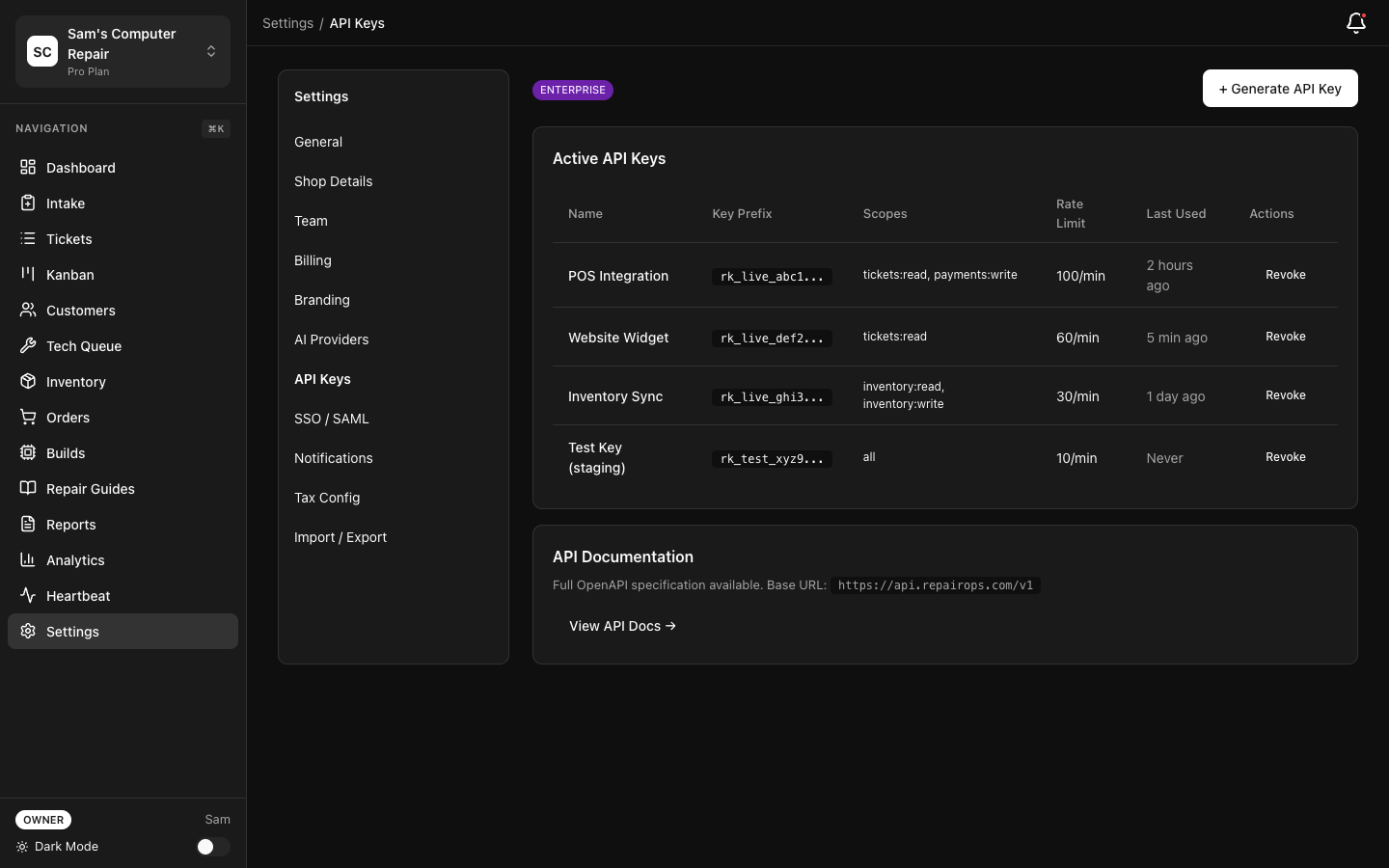
Authorization: Bearer YOUR_API_KEYGenerate and manage API keys in Settings → API Keys. Keys are scoped to permissions (Read, Write, Admin).
Base URL
Section titled “Base URL”https://api.repairops.io/v1All examples use this base URL.
Quickstart Playground
Section titled “Quickstart Playground”These examples cover the three most common starting points.
/tickets?status=IN_REPAIR&limit=25 curl -X GET "https://api.repairops.io/v1/tickets?status=IN_REPAIR&limit=25" \
-H "Authorization: Bearer YOUR_API_KEY"const response = await fetch(
"https://api.repairops.io/v1/tickets?status=IN_REPAIR&limit=25",
{
headers: {
Authorization: "Bearer YOUR_API_KEY",
},
}
);
const data = await response.json();
console.log(data);import requests
response = requests.get(
"https://api.repairops.io/v1/tickets",
params={"status": "IN_REPAIR", "limit": 25},
headers={"Authorization": "Bearer YOUR_API_KEY"},
)
print(response.json()){
"data": [
{
"id": "550e8400-e29b-41d4-a716-446655440000",
"number": "T001234",
"status": "IN_REPAIR"
}
],
"pagination": {
"offset": 0,
"limit": 25,
"total": 1
}
}/tickets/:ticket_id curl -X GET "https://api.repairops.io/v1/tickets/TICKET_ID" \
-H "Authorization: Bearer YOUR_API_KEY"const response = await fetch(
"https://api.repairops.io/v1/tickets/TICKET_ID",
{
headers: {
Authorization: "Bearer YOUR_API_KEY",
},
}
);
const ticket = await response.json();
console.log(ticket);import requests
response = requests.get(
"https://api.repairops.io/v1/tickets/TICKET_ID",
headers={"Authorization": "Bearer YOUR_API_KEY"},
)
print(response.json()){
"id": "550e8400-e29b-41d4-a716-446655440000",
"number": "T001234",
"status": "IN_REPAIR"
}/tickets curl -X POST "https://api.repairops.io/v1/tickets" \
-H "Authorization: Bearer YOUR_API_KEY" \
-H "Content-Type: application/json" \
-d '{
"shop_id": "shop-uuid",
"customer": {
"name": "Jane Smith",
"email": "jane@example.com"
},
"device_identifier": "MacBook Pro 16\"",
"issue_description": "Won't turn on",
"device_category": "laptop"
}'const response = await fetch("https://api.repairops.io/v1/tickets", {
method: "POST",
headers: {
Authorization: "Bearer YOUR_API_KEY",
"Content-Type": "application/json",
},
body: JSON.stringify({
shop_id: "shop-uuid",
customer: {
name: "Jane Smith",
email: "jane@example.com",
},
device_identifier: "MacBook Pro 16\"",
issue_description: "Won't turn on",
device_category: "laptop",
}),
});
const created = await response.json();
console.log(created);import requests
response = requests.post(
"https://api.repairops.io/v1/tickets",
headers={
"Authorization": "Bearer YOUR_API_KEY",
"Content-Type": "application/json",
},
json={
"shop_id": "shop-uuid",
"customer": {
"name": "Jane Smith",
"email": "jane@example.com",
},
"device_identifier": "MacBook Pro 16\"",
"issue_description": "Won't turn on",
"device_category": "laptop",
},
)
print(response.json()){
"id": "ticket-uuid",
"number": "T001235",
"status": "INTAKE",
"created_at": "2026-02-21T10:00:00Z"
}Rate Limiting
Section titled “Rate Limiting”Rate limits depend on API key scope:
| Scope | Requests/Hour |
|---|---|
| Read | 1,000 |
| Write | 100 |
| Admin | 10 |
Rate limit information is returned in response headers:
X-RateLimit-Limit: 1000X-RateLimit-Remaining: 999X-RateLimit-Reset: 1646899200When exceeded, the API returns 429 Too Many Requests.
Error Handling
Section titled “Error Handling”All error responses follow this format:
{ "error": { "code": "INVALID_REQUEST", "message": "Invalid ticket ID format", "details": { "field": "ticket_id", "value": "invalid-uuid" } }}Common Error Codes
Section titled “Common Error Codes”| Code | Status | Meaning |
|---|---|---|
UNAUTHORIZED | 401 | Missing or invalid API key |
FORBIDDEN | 403 | Insufficient permissions for this operation |
NOT_FOUND | 404 | Resource does not exist |
INVALID_REQUEST | 400 | Malformed request or invalid parameters |
CONFLICT | 409 | Resource conflict (e.g., duplicate entry) |
RATE_LIMIT_EXCEEDED | 429 | Too many requests; retry later |
SERVER_ERROR | 500 | Internal server error; contact support |
Tickets
Section titled “Tickets”List Tickets
Section titled “List Tickets”Get all repair tickets for your organization.
Request:
GET /tickets ?shop_id=uuid &status=IN_REPAIR &created_after=2026-01-01 &created_before=2026-02-01 &limit=50 &offset=0Query Parameters:
shop_id(optional) — Filter by shopstatus(optional) — Filter by status (INTAKE, TRIAGE, IN_REPAIR, CLOSED, etc.)customer_id(optional) — Filter by customercreated_after(optional) — Only tickets created after this date (ISO 8601)created_before(optional) — Only tickets created before this datelimit(optional) — Number of results (default: 50, max: 500)offset(optional) — Pagination offset (default: 0)
Response:
{ "data": [ { "id": "550e8400-e29b-41d4-a716-446655440000", "number": "T001234", "status": "IN_REPAIR", "customer_id": "customer-uuid", "customer_name": "John Doe", "device_identifier": "iPhone 14 Pro", "issue_description": "Cracked screen", "total_cost": 259.99, "labor_cost": 99.99, "parts_cost": 160.00, "created_at": "2026-02-15T10:30:00Z", "updated_at": "2026-02-20T14:15:00Z", "assigned_to": "tech-uuid", "assigned_to_name": "Alice Tech" } ], "pagination": { "offset": 0, "limit": 50, "total": 1250 }}Get Ticket Details
Section titled “Get Ticket Details”Retrieve a single ticket with full details.
Request:
GET /tickets/:ticket_idResponse:
{ "id": "550e8400-e29b-41d4-a716-446655440000", "number": "T001234", "status": "IN_REPAIR", "customer": { "id": "customer-uuid", "name": "John Doe", "email": "john@example.com", "phone": "555-0123" }, "device": { "identifier": "iPhone 14 Pro", "category": "smartphone", "description": "Blue, 256GB" }, "issue": { "description": "Cracked screen", "category": "physical_damage", "severity": "high" }, "timeline": [ { "status": "INTAKE", "timestamp": "2026-02-15T10:30:00Z", "actor": "John Doe (customer)" }, { "status": "DIAGNOSTICS", "timestamp": "2026-02-15T11:00:00Z", "actor": "Alice Tech" }, { "status": "IN_REPAIR", "timestamp": "2026-02-16T09:00:00Z", "actor": "Alice Tech" } ], "diagnostics": { "findings": "Screen is damaged; digitizer also broken", "estimated_cost": 259.99, "recommended_parts": ["iPhone 14 Pro Screen", "Digitizer Assembly"] }, "labor": { "hours": 1.5, "rate": 65.00, "total": 97.50 }, "parts": [ { "name": "iPhone 14 Pro Screen", "quantity": 1, "unit_cost": 80.00, "total": 80.00 }, { "name": "Digitizer Assembly", "quantity": 1, "unit_cost": 80.00, "total": 80.00 } ], "total_cost": 259.99, "created_at": "2026-02-15T10:30:00Z", "updated_at": "2026-02-20T14:15:00Z"}Create Ticket
Section titled “Create Ticket”Create a new repair ticket programmatically.
Request:
POST /tickets -H "Content-Type: application/json" -d '{ "shop_id": "shop-uuid", "customer": { "name": "Jane Smith", "email": "jane@example.com", "phone": "555-0456" }, "device_identifier": "MacBook Pro 16\"", "issue_description": "Won't turn on, possible liquid damage", "device_category": "laptop" }'Request Body:
shop_id(required) — Which shop this ticket belongs tocustomer.name(required) — Customer namecustomer.email(required) — Customer emailcustomer.phone(optional) — Customer phonedevice_identifier(required) — Device name/modelissue_description(required) — What’s wrong with the devicedevice_category(optional) — Device type (laptop, phone, tablet, etc.)
Response:
{ "id": "ticket-uuid", "number": "T001235", "status": "INTAKE", "created_at": "2026-02-21T10:00:00Z"}Update Ticket
Section titled “Update Ticket”Update ticket details (cost, status, assignments, etc.).
Request:
PATCH /tickets/:ticket_id -H "Content-Type: application/json" -d '{ "status": "IN_REPAIR", "assigned_to": "tech-uuid", "labor_hours": 2, "labor_rate": 65 }'Request Body: (all optional)
status— New status (INTAKE, TRIAGE, DIAGNOSTICS, etc.)assigned_to— Technician user IDlabor_hours— Hours spent on repairlabor_rate— Hourly labor rateparts— List of parts used
Response:
{ "id": "ticket-uuid", "status": "IN_REPAIR", "updated_at": "2026-02-21T11:00:00Z"}Transition Ticket Status
Section titled “Transition Ticket Status”Move a ticket to a new status (respects workflow rules and permissions).
Request:
POST /tickets/:ticket_id/transition -H "Content-Type: application/json" -d '{ "new_status": "QC_REVIEW", "notes": "Ready for quality check" }'Request Body:
new_status(required) — Target statusnotes(optional) — Comment for the status change
Response:
{ "ok": true, "event_id": "event-uuid", "from_status": "IN_REPAIR", "to_status": "QC_REVIEW", "timestamp": "2026-02-21T15:00:00Z"}Error if transition is invalid:
{ "error": { "code": "INVALID_TRANSITION", "message": "Cannot transition from IN_REPAIR to INTAKE", "details": { "from": "IN_REPAIR", "to": "INTAKE" } }}Customers
Section titled “Customers”List Customers
Section titled “List Customers”Get all customers in your organization.
Request:
GET /customers ?shop_id=uuid &name=John &created_after=2026-01-01 &limit=50Response:
{ "data": [ { "id": "customer-uuid", "name": "John Doe", "email": "john@example.com", "phone": "555-0123", "address": "123 Main St, Anytown, NY 12345", "lifetime_spend": 599.99, "total_tickets": 3, "last_repair_date": "2026-02-20", "created_at": "2025-06-15T10:00:00Z" } ], "pagination": { "offset": 0, "limit": 50, "total": 2450 }}Get Customer Details
Section titled “Get Customer Details”Request:
GET /customers/:customer_idResponse:
{ "id": "customer-uuid", "name": "John Doe", "email": "john@example.com", "phone": "555-0123", "address": "123 Main St, Anytown, NY 12345", "lifetime_spend": 599.99, "total_tickets": 3, "repairs": [ { "ticket_id": "ticket-uuid", "date": "2026-02-20", "device": "iPhone 14 Pro", "status": "CLOSED", "cost": 259.99 } ], "created_at": "2025-06-15T10:00:00Z"}Inventory
Section titled “Inventory”List Inventory Items
Section titled “List Inventory Items”Get all inventory in your shop.
Request:
GET /inventory ?shop_id=uuid &category=screens &in_stock=true &limit=50Response:
{ "data": [ { "id": "inventory-uuid", "sku": "SCREEN-IP14-001", "name": "iPhone 14 Pro Screen", "category": "screens", "quantity_on_hand": 5, "quantity_reserved": 2, "quantity_available": 3, "cost": 80.00, "selling_price": 160.00, "reorder_level": 2, "supplier": "Tech Parts Inc", "last_updated": "2026-02-20T10:00:00Z" } ], "pagination": { "offset": 0, "limit": 50, "total": 342 }}Update Inventory
Section titled “Update Inventory”Adjust stock levels.
Request:
PATCH /inventory/:inventory_id -H "Content-Type: application/json" -d '{ "quantity": 10, "reason": "purchased" }'Request Body:
quantity(required) — New quantity on handreason(optional) — Why quantity changed (purchased, used, damaged, etc.)
Get KPI Snapshots
Section titled “Get KPI Snapshots”Retrieve historical KPI data for dashboards.
Request:
GET /kpis ?shop_id=uuid &start_date=2026-01-01 &end_date=2026-02-28 ?metrics=revenue,throughput,turnaroundResponse:
{ "data": [ { "date": "2026-02-20", "revenue": 3450.00, "throughput": 12, "avg_turnaround_days": 2.3, "qc_pass_rate": 0.95, "customer_satisfaction": 4.7, "labor_margin": 0.35, "parts_margin": 0.48 } ], "summary": { "period_start": "2026-01-01", "period_end": "2026-02-28", "total_revenue": 67500.00, "total_tickets": 245, "avg_ticket_value": 275.51 }}Webhooks
Section titled “Webhooks”Subscribe to real-time events via webhooks (Enterprise only).
Webhook Events
Section titled “Webhook Events”Configure webhook endpoints in Settings → API → Webhooks.
Supported Events:
ticket.created— New ticket createdticket.transitioned— Ticket status changedticket.updated— Ticket details modifiedpayment.processed— Payment receivedcustomer.created— New customer createdinventory.updated— Stock level changed
Webhook Payload
Section titled “Webhook Payload”{ "event": "ticket.transitioned", "timestamp": "2026-02-21T15:30:00Z", "data": { "ticket_id": "ticket-uuid", "ticket_number": "T001234", "from_status": "IN_REPAIR", "to_status": "QC_REVIEW", "shop_id": "shop-uuid" }}Webhook Retry Policy
Section titled “Webhook Retry Policy”Failed webhook deliveries are retried:
- 1st attempt: Immediate
- 2nd attempt: 5 minutes
- 3rd attempt: 30 minutes
- 4th attempt: 2 hours
- 5th attempt: 24 hours
After 5 failed attempts, webhook is disabled. Monitor webhook status in Settings → API → Webhooks.
Pagination
Section titled “Pagination”All list endpoints support pagination:
GET /tickets?limit=50&offset=100Response includes:
{ "data": [ ... ], "pagination": { "offset": 100, "limit": 50, "total": 1250, "next_offset": 150, "has_more": true }}Use next_offset to fetch the next page, or increment offset manually.
Filtering & Sorting
Section titled “Filtering & Sorting”Most endpoints support filtering by common fields:
GET /tickets?status=IN_REPAIR&created_after=2026-01-01&sort=-created_atCommon filters:
shop_id— Filter by shopstatus— Filter by statuscustomer_id— Filter by customercreated_after/created_before— Date range filteringsort— Sort order (fieldor-fieldfor descending)
SDK Example
Section titled “SDK Example”Using the JavaScript SDK:
import { RepairOpsClient } from '@repairops/sdk'
const client = new RepairOpsClient({  apiKey: process.env.REPAIROPS_API_KEY})
// List ticketsconst tickets = await client.tickets.list({  shop_id: 'shop-uuid',  status: 'IN_REPAIR'})
// Get ticket detailsconst ticket = await client.tickets.get('ticket-uuid')
// Create ticketconst newTicket = await client.tickets.create({  shop_id: 'shop-uuid',  customer: {    name: 'Jane Doe',    email: 'jane@example.com'  },  device_identifier: 'iPhone 14',  issue_description: 'Cracked screen'})
// Transition statusawait client.tickets.transition('ticket-uuid', {  new_status: 'IN_REPAIR'})
Best Practices
Section titled “Best Practices”Pagination: Always use pagination. Don’t fetch all records at once; iterate through pages.
Rate limiting: Monitor rate limit headers. Implement exponential backoff for retries.
Error handling: Handle all error codes gracefully. Log errors and alert on 500 errors.
Webhooks: Verify webhook signatures before processing. Implement idempotency for duplicate events.
API keys: Rotate keys every 90 days. Use separate keys for different applications. Store keys securely (environment variables, secrets manager).
Changelog
Section titled “Changelog”v1.0 (2026-02-01)
Section titled “v1.0 (2026-02-01)”- Initial REST API release
- Tickets, Customers, Inventory endpoints
- KPI data access
- Webhook support
- Rate limiting
Related Documentation
Section titled “Related Documentation”- Developer Overview — SDK and integration patterns
- Plugin SDK — Build custom plugins
- Webhooks Reference — Real-time event notifications